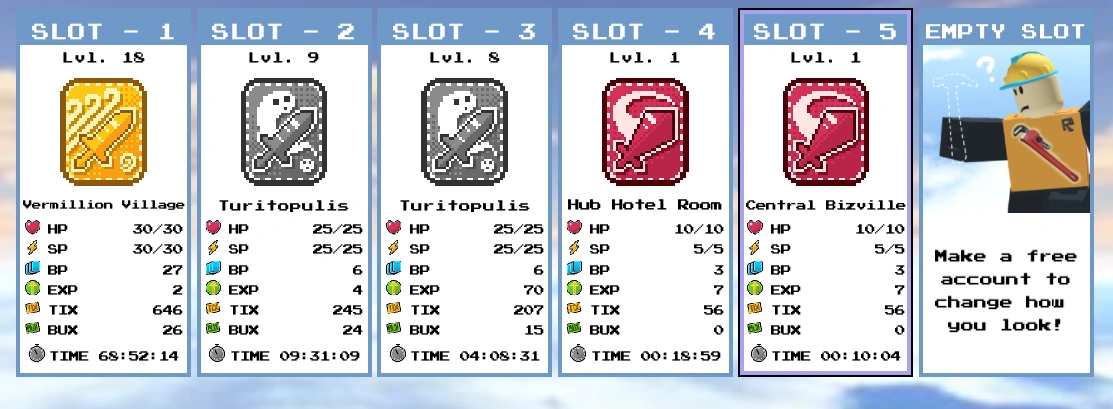
The current save file menu, as of Chapter 5's release.
In Block Tales, players can choose to play the game through save files, which allows the player to re-play the game multiple times in order to complete achievements that could no longer be accessible beyond a specific point in a main save file.
Usage
Save files can be seen in the File Select screen that is shown after clicking on the Menu. There are six save files that can be used.
You are able to create a save file by clicking on a empty slot, marked by the confused Builderman and the text "Make a free account to change how you look!". You can also delete a save file, by clicking on the Delete File button and then clicking on your desired save file five times.
Save files can be accessed through the options section of the Menu, by clicking on the File Select button.
Gallery


 Ice Dagger.
 Venomshank.
 Ghostwalker.


Associated Badges
 | Humble Beginnings Start a new save file. |
Trivia
- Save files can be used to identify what sword will appear next chapter, as seen in the gallery. As of Demo 5, the next sword will be the Darkheart.
- Prior to Demo 4's release, there were only 4 save files.
- The “make a free account to change how you look!” description on each empty save file is a reference to how Roblox Guests could not change their appearance and had to sign up with Roblox to do so.
- As of Demo 5, save files can be named.
View • Edit •  Wiki NavigationWiki Navigation Wiki NavigationWiki Navigation
| ||||||
|---|---|---|---|---|---|---|
.
| ||||||


